CASE STUDY
SOLO PROJECT · B2B SAAS · 2025–2026 · AI PRODUCT
FieldLedger
An estimate takes a contractor hours, and their client days to receive.
OVERVIEW
FieldLedger turns a job description and a few photos into a structured estimate in under a minute, then carries that same document through proposal, invoice, and a portal the client can follow. I designed and built it end to end.
I heard the same problem from both sides of it. My mom is a real estate agent, and she was with a client frustrated that a contractor’s estimate was taking days. My uncle is a contractor, and he told me estimates take him hours, evenings, after the actual work is done.
THE PROBLEM
01 — Estimates cost the contractor hours he doesn’t have.
Measuring, pricing line items, checking material costs, formatting something presentable. A night’s work per job, done after a full day on site. That is why quoting gets deferred.
02 — Which means the client waits days.
The homeowner isn’t waiting on a decision, they’re waiting on paperwork. Days pass, they get two other quotes, and the delay reads as disinterest even when the contractor wants the job.
03 — Nothing shares a spine.
Estimates shared in a spreadsheet, proposal shared over email, invoices somewhere else, and project status updates over text. The same numbers get retyped four times, which is where the errors and the disputes come from.
HOW I DESIGNED IT
One document, four views.
An estimate, a proposal and an invoice are the same object at different stages, not three products. Line items entered once flow through to the client-facing proposal and then to the invoice. That single decision removed most of the app’s surface area.
The AI writes a draft, not an answer.
Generated line items land in an editable table, pre-priced but clearly provisional. A contractor’s credibility is on that number, so the interaction is review and adjust, never accept. Better a fast first pass than a black box.
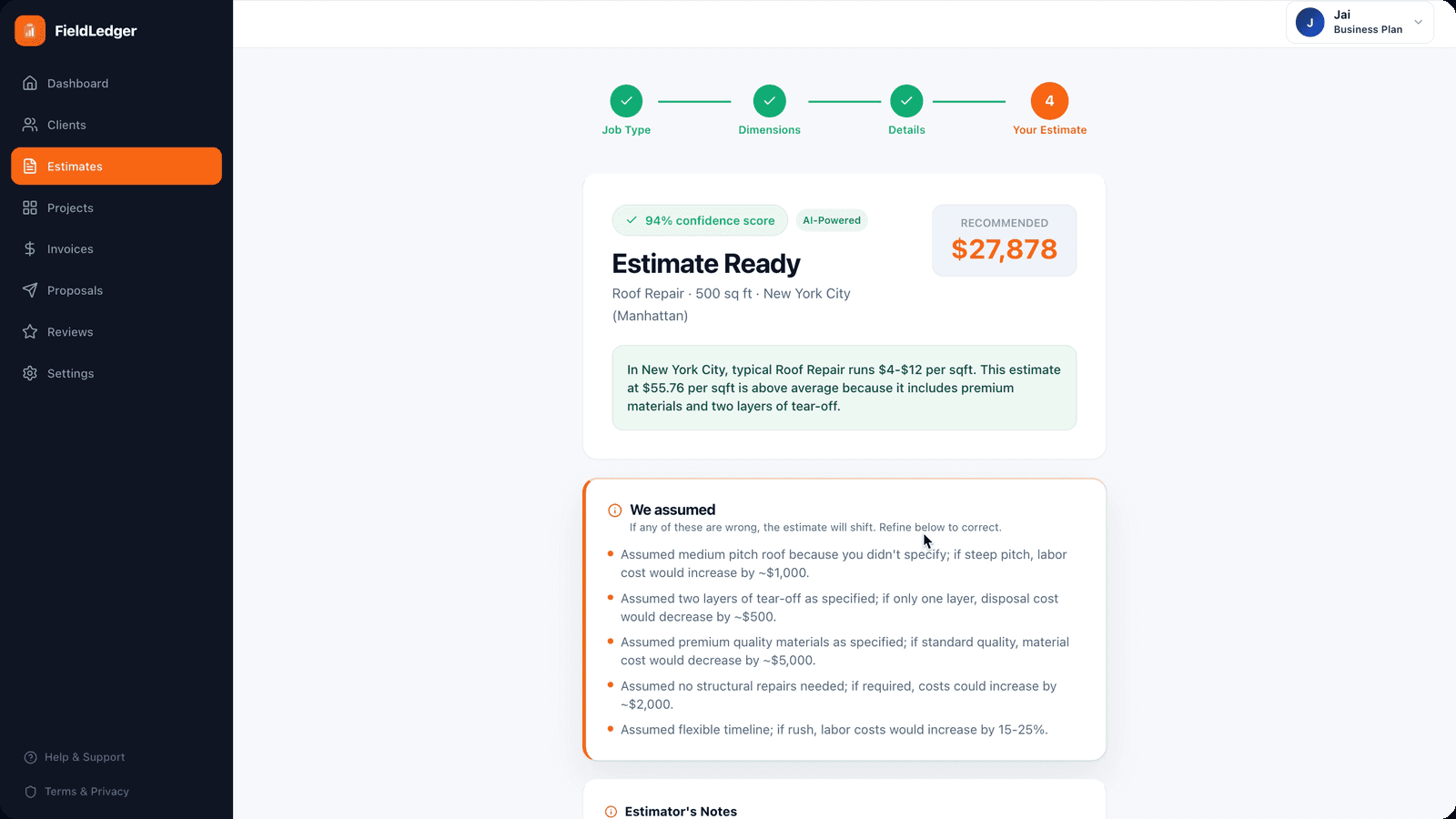
The estimate arrives with its assumptions listed
Two very different people, one set of numbers.
Contractors get a dense workspace with a sidebar and quick actions. What reaches the client is deliberately the opposite: a clean document they open from a link, with no account to create and nothing to navigate. A homeowner is not going to sign up for software to look at a quote. There’s a client portal on the other side of that link where they can follow the job, but the first thing they see is just the document.

Building a proposal, with a live preview of the PDF the client receives
Onboarding as a visible checklist.
A brand new account has no clients, no estimates and no invoices, so the dashboard would open as a grid of zeros. Instead it opens with a three-step checklist, so there’s always an obvious next thing to do.
Quick actions over navigation.
The dashboard leads with New Estimate as a primary button rather than burying it in a menu, because that is the one thing a contractor opens the app to do.
WHAT CHANGED
The first estimate flow was too simple to be useful.
The first version asked for a job description, a few photos and square footage, and generated a line-item estimate from that. It worked, and it was wrong.
I put it in front of my uncle, and posted it to a few contractor subreddits to get it in front of people with no reason to be nice about it. The feedback was consistent: a roofing estimate and an HVAC estimate are not the same form. Roofing needs pitch, how many layers are coming off, and material. HVAC needs tonnage, the condition of the existing ductwork, and the age of the system. Without those the number is a guess, and a guess is worse than nothing, because if it comes in low the contractor covers the difference out of their own margin.
So the flow became trade-aware. You pick the job type first, and the questions that follow are the ones that trade actually prices on. It asks more than I wanted it to, which is why it’s four short steps instead of one long form.

Start with the trade. The questions change from there.
WHAT I’D DO NEXT
Getting the photo-to-estimate accuracy higher
The thing that decides whether FieldLedger is actually useful is how accurately it turns a photo and a short description into real line items. Right now it’s good, but not good enough that a contractor could send an estimate without reading it first, and closing that gap is the most valuable work left. After that, more time on the mobile experience, since a lot of this should happen on site rather than at a desk later that night.